An explaination of RES.net by analogy
If you find it hard to understand what role RES.net plays for you when you use it,
consider the following analogy of a inter- and intra-state highway system.
Technical RES.net STUFF
But first, some light technical stuff. RES.net is a network. A network is "merely" a collection of computers connected by some physical medium. The medium used in RES.net (and the entire campus network) is called Ethernet. Ethernet networks work by providing a "talk path" for any PC connected by it, anytime the PC wants, and for as long as it wants it. There are only three basic rules computers attached to the network must follow:
- Don't talk when others are talking
- You may only "speak" a set amount of information. Then you must shut up for a minimum period of time, after which you may "speak" again, or someone else may speak, as long as rule 1 is followed.
- If two parties speak at the same time, they must stop speaking and choose a random number. After that random time number has passed, the party may attempt to speak again, provided the above rules are followed.
This type of setup looks much like a conference-call telephone conversation. You only speak to the group when everyone is quiet, or no one will understand what either of the speakers is saying. You must stop at some point to draw a breath, but anyone else who wants to speak must wait a minimum amount of time before they can try to start talking, or the participating parties will loose track of who is speaking.
Now, people are not as "smart" as computers. When we set computers up in a network (a conference-call like setup), any computer can speak to any other computer or group of computers as if they were the only members of the conversation. The set amount of inbformation mentioned in rule 2 above is termed a "packet" in network terminology. A packet is merely a container filled with information, like an envelope it to us.
PC A can converse (using packets) with PC B as long as it follows the rules (above), and will be oblivious to the existance of PCs C, D, and E, who may be conversing among themselves or with other PCs.
How can they do this? Well, each packet has identification attached to it. When PC A wants to talk to PC B, it makes up a packet, addresses it to PC B, adds its own address in what is essentially a "return address" field, and sends it to PC B. PC B, meanwhile, it watching the network for any packets addressed to it. When it finds one, it picks it up, reads and reads the information. If a response was requested by the sender, PC B will place thre sender's address in the Return Address field, and it own address in the sneder field, and send the packet out into the network, where the PC to whom it's addressed will pick it up and do something with it.
As described above, when a PC wishes to use the network, it must wait untill no one else is using it. Then it may send its information. But, what if two PCs detect that no one is using the network and send something at the same time? This situation results in a colission, and Rule 3 above is followed. The two PCs detect the colission and start counting to a random number. When they reach that random number, they make sure the network is unused and try again.
As more and more PCs use the network, it becomes more and more difficult to find a time when the network is unused and a packet can be transmitted. Colissions occcur more frequently. This phenomenon is called "load". Load increases as the number of PCs actively attempting to use the network increases.
Riding the Highway
RES.net is actually part of the campus network. PCs attached to the campus network connect to a data jack in the office or room where the PC is located. A wire runs from the data jack to a device called a hub. The basic job of the hub is to collect all data transmitted by the computers attached to it and send it (the data) out to the rest of the network. The hub also receives data from the rest of the network and relays it to the computers connected to it.
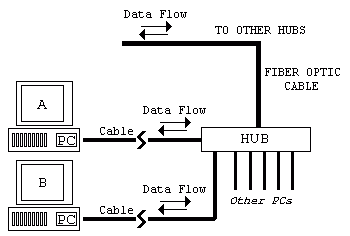
The campus is divided up into "zones", usually by building (if the building has many computers within (like Holman or Green Hall) or by areas: many small buildings are grouped together and served by one hub system). Each "zone" has a set of hubs located in it. All the PCs in that zone attach to the hubs in order to gain access to the campus network.
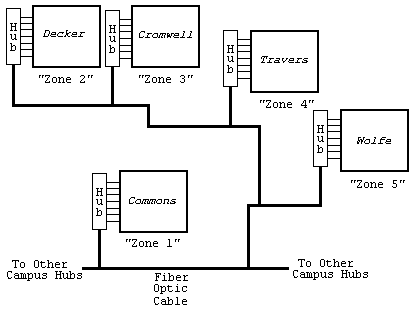
Each hub in each zone is connected to all the other "zone" hubs on campus via fiber optic cable (You know the stuff, AT&T, MCI, and Sprint talk about it all the time). In this way, data sent by a computer in Decker can be received and processed by a server in Crowell. In theory, every computer on the campus network can "see" every other computer on the campus network (in reality, each computer has a unique address assigned to it, much like a phone number. A calling computer must know that address to access a remote computer).
The Analogy
A state highway system is very similar to a computer network like RES.net. They both provide a means of transportation of objects, be they people or computer data. In this analogy, your PC is like your car, and the campus network is the highway system.

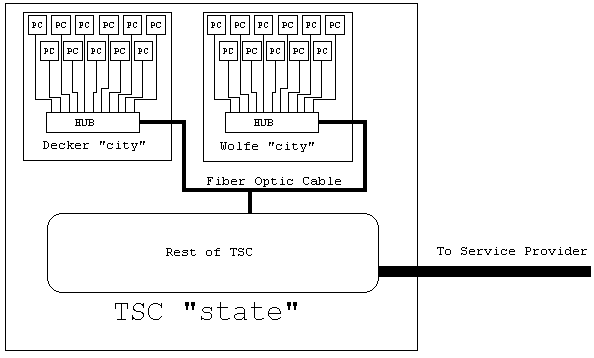
For the analogy, one can view the TSC campus network system as a "state" in a vast "country" that is made up of all the networks in the US (The world is included here, too. But that's really too big for our discussion). Each building or "zone" (see above) at TSC can be viewed as a "city" within the TSC network "state". Looking closely at one residence hall (Decker, for example), we will see that all the individual computers are connected to a hub - the "Decker Hub". This system of connections might be viewed as local roads within a city. The Decker hub also connects to every other hub via fiber optic cable. This connection might be viewed as I287 or the Turnpike.
So, every "house"(PC) in every "city" (building/zone) is connected to every other "house"(PC) through the hub in that building/zone. These connection might be viewed as small backroads. Also, every "city"(building/zone) in the TSC "state"(campus network) by "highways" of fiber optic cable.
Getting Away from Home
But, what good is a state if you can't get STUFF into or out of it? New Jersey would certainly be unable to function if the interstates, railways, airlines, and sea ports did not exist. In much the same way, the TSC campus network is not good for much more than contacting the campus UNIX/TSCVM/Novell systems unless it has an external connection to get it into the rest of the world (the Internet).
Such a connection exists.
The Plot Thickens
In order to access the Internet, a connection was made between the TSC network system and an Internet Service Provider. This connection is basically a direct phone connection to the service provider's network. The service provider then connects to a larger service rpovider, and so on. One service provider might provide for hundreds of computers and computer networks. When you are at home and dial in to TSC, TSC becomes a service provider for you (albeit a small one). For our analogy, the Service Provider connection is equivalent to the Interstate Highway system. Without the Interstate Highway system, no appreciable amount (read "none at all") of cargo could travel into or outof New Jersery by ground transport. Thus, without our Internet Service Provider, TSC has no connection to the Internet. You can't telnet to Rutgers, and Rutgers students could not telnet here.
Rush Hour
Computer networks and computer systems have "rush hours", just like roads do. Most people know that the period between 7:30am and 10:00am is when one can hardly budge on Route 1. But come 11:00, it may be empty. Traffic may pick up between 12:00 and 1:30 as people come and go to lunch, and then dies down between 2:00 and 4:00. But between 4:00 and 6:00, watch out. It's bumber-to-bumper all the way home.
Computer systems and networks are like this, too. One can expect that if computer science classes are going on in Holman, the HOLMAN1 server will be slower that it is at 2:00am. The same holds true for systems external to the College. Rutgers systems will certainly be slower during class hours than during off-class hours. Commercial systems like IBM's or Microsoft's systems will be slower during their business hours than during non-business hours.
The following figure graphs the use of a fictional network and somputer system called Foo. The Foo system serves local businesses. It provides information about its line of widgets. Notice how the graph rises and falls, indicating increasing and decreasing usage. Apparently many of Foo's users go on lunch break at the same time, and few work late into the night.
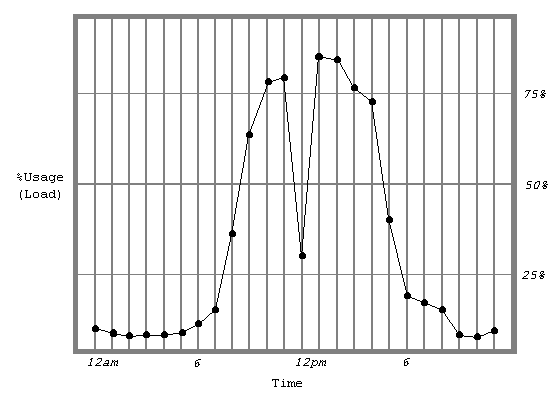
So, just as the Foo system's load changes by the hour, so does the TSC Campus network's. When many people are using the network, data will be transferred from a remote system to your system and back much slower. Expect to find slow downs in the evening and night on weekdays, and the afternoon and well into the night for weekends. Expect TSC systems to be slow during class hours, and the daytime hours when commuters will be online.
Construction
Just as highways undergo construction, so do computer systems and networks. Occasionally the UNIX system will go down as the administrator installs some piece of hardware or updates software. Intentional shutdowns are usually scheduled to inconvenience the least number of users, however if emergency repairs are necessary, they may occur at any time. Besides specific computer systems on campus, the Internet connection can also be shut down by the Service Provider, though maintainence is usuually schedule over vacations.
Other Traffic Creators
Besides being intentionally shut down, computer systems and network crash. Basically, something has happend in the system that prevent it from continuing its work, and it just stops. Crashes can be cause by electrical disturbances, faulty hardware or software, or extremely high load. Being that RES.net is being brought up all at once for the first time this year, it can be expected that some or all o the RES.net network will crash at some time. We are confident that the causes of these crashes can be tracked down and eradicated. **Some examples of situations where load becomes so great that the network crashes are network games like DOOM and _____. Being that the PCs in each "zone" are not isolated from each other, every PC on every hub can "hear" what every other PC is saying. As discussed above, as long as a PC is "talking", no other PC can talk. Network games are VERY demanding on networks. Every player's move must be relayed to his partner. The amount of data that must be relayed is immense, and grows quickly as more participants enter the game, or as more people start new games.
| Num PCs | Num Connections |
| 2 | 2 |
| 3 | 6 |
| 4 | 12 |
| 5 | 20 |
| 6 | 30 |
| assume 2 connections between each participating PC |